Seamlessly connect Pronnel with popular WordPress form builders like Contact Form 7, WPForms, Ninja Forms, Divi, and Elementor through Pronnel's integration — no custom code or vendor lock-in required with Pronnel.
Transform your form management operations with Pronnel's intelligent automation. Connect popular WordPress form plugins like Contact Form 7, WPForms, Gravity Forms, Forminator, Elementor, and more with Pronnel CRM and project management platform. Pronnel turns every submission into actionable items, automates follow-ups, and keeps your workflows organized.
From submissions to action — automatically

Seamlessly connect your WordPress website with Pronnel to turn form submissions into structured workflows. Automate lead capture, support requests, and project intakes directly from Contact Form 7, WPForms, Gravity Forms, or any other plugin—no manual data entry required.

Bring every submission from your WordPress website straight into Pronnel. Pronnel's unified platform eliminates the need to switch between tools — whether you use Contact Form 7, WPForms, Gravity Forms, or others, each submission can instantly create or update items in Pronnel, trigger automations, assign owners, and notify teams for faster response and better collaboration within Pronnel's CRM and project management workspace powered by Pronnel's intelligent automation.
Unlock powerful capabilities that transform your workflow
Seamlessly connect Pronnel with popular WordPress form builders like Contact Form 7, WPForms, Ninja Forms, Divi, and Elementor through Pronnel's integration — no custom code or vendor lock-in required with Pronnel.
Turn every form submission into action in Pronnel — auto-create items, assign tickets, notify users, send message channels, or send emails the moment a visitor submits a form through Pronnel's automated workflows.
Map form fields directly to Pronnel item attributes to ensure structured, accurate, and actionable data across teams and projects within Pronnel's unified platform.
Manage and track all submissions across multiple WordPress sites in one unified Pronnel workspace — complete with automation logs, team visibility, and activity tracking through Pronnel's integrated dashboard.
From submissions to action — automatically
See how WordPress integration with Pronnel transforms your workflow



Pronnel's WordPress forms integration standardizes intake, reduces manual work, automates responses, and accelerates response times across teams. Pronnel enables seamless integration between your form submissions and business processes.

Pronnel reduces manual processing time and improves data accuracy
Pronnel increases conversion through timely follow-up and automated workflows
Pronnel improves visibility across teams, keeping Sales, Support, and Ops aligned


 WordPress Forms


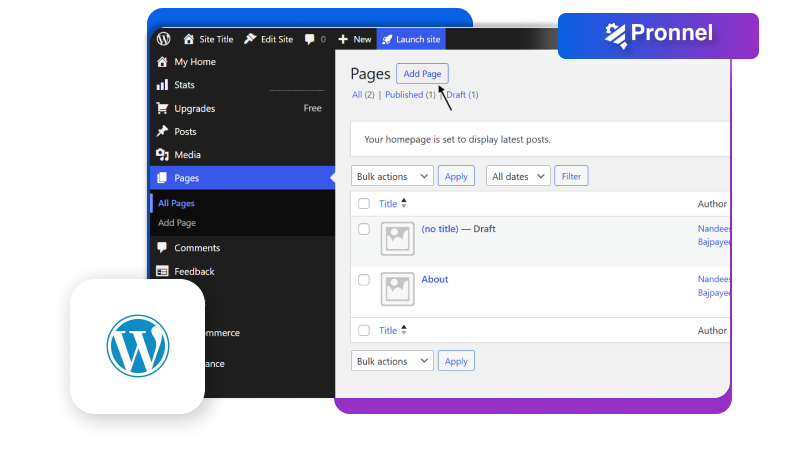
Pronnel supports the following WordPress form plugins. Use each plugin’s Webhook (or native connector when available) to send submissions to Pronnel and create items automatically.
Send submissions via webhook; great for simple contact forms.
Use Webhooks addon; supports conditional logic and multi-step forms.
Powerful builder; push data using Webhooks for complex workflows.
Forms, polls, and quizzes; configure a webhook endpoint to Pronnel.
Elementor Pro form widget; use the webhook action to post to Pronnel.
Fast, modern builder; set up a Webhook feed to Pronnel.
Drag-and-drop; integrate using the Webhooks extension.
Divi Theme module; send externally via hooks or addons.
Simple and flexible; configure webhook to send submissions.
Advanced builder with calculations and views; post entries to Pronnel via webhook.
Elementor-based form plugin; configure webhook action to send submissions to Pronnel.
Tip: Map fields (Name, Email, Message, etc.) to Pronnel item attributes (Text, Email, Number, Status). Use Automations to assign owners, set statuses, and notify teams on submission.
Pronnel supports Contact Form 7, WPForms, Gravity Forms, Forminator, Elementor Forms, Fluent Forms, Divi Forms, and more. Pronnel's WordPress forms integration works with all major WordPress form builders.
Yes, Pronnel allows you to map any form field to Pronnel board attributes like text, numbers, statuses, and labels. Pronnel's field mapping ensures structured data in your Pronnel workspace.
Pronnel connects to WordPress forms through webhooks, API, or direct integrations depending on the plugin. Pronnel's tutorial covers all connection approaches for seamless integration.
Yes, Pronnel supports multiple WordPress websites. Create multiple app instances in Pronnel—one per site or form—for clean separation and organized management within Pronnel's unified platform.
Pronnel centralizes WordPress form submissions by reducing manual data entry and providing real-time form updates. Pronnel's WordPress forms integration streamlines your form processes and improves team productivity significantly through unified project management.
Follow Pronnel's step-by-step tutorial to integrate your favorite form plugins with Pronnel's unified platform.
View Pronnel WordPress Forms Tutorial
Sales & Marketing Manager in United Arab Emirates
A positive experience. Very feature rich. Very adaptable and configurable. You won't feel "nickle-and-dimed" from the product as pretty much everything is included.

Business Development Head in United Arab Emirates
Love the user interface and the straightforward navigation. Tailoring the CRM was effortless, thanks to the amazing customization options.

Executive Assistant in India
Ease of use and efficiency with which I could see which all tasks have been done and what is yet to do